
Why 2025 is the Best Year to Launch Your Hiking Blog
Have you ever returned from an incredible hike and thought, “I wish more people could experience this?” If so, starting a hiking blog might be your perfect next adventure.
In 2025, outdoor travel and hiking continue to explode in popularity. With people seeking meaningful, healthy escapes from digital overload, sharing your trail experiences, gear recommendations, and hiking tips is more valuable—and profitable—than ever before.
Not only does a hiking blog let you document your adventures, but it can also build a vibrant online community, open opportunities for sponsorships, and even become a real income stream. And guess what? You don’t need to be a professional hiker or a tech wizard to get started.
👍 With that in mind, I have a question for you:
Are you ready to turn your passion for hiking into a rewarding online brand?
If you answered yes, read on and let’s change your life.
In this comprehensive guide, you’ll learn:
Ready to hit the first trail? Let’s dive into Step 1!
Need the full blogging roadmap? Don’t miss our ultimate guide: How to Start a Blog and Make Money in 2025
Step 1: Define Your Hiking Blog’s Purpose
Before you Start a Hiking Blog, even buy a domain name or install WordPress, you must get crystal clear about your blog’s mission.
Ask yourself:
- Am I doing this mainly for fun and documentation?
- Do I eventually want to build an audience and monetize?
- Who exactly do I want to help or inspire with my content?
There’s no wrong answer—but clarity now saves you frustration later.
Common Hiking Blog Purposes:
| Purpose | Description | Example |
|---|---|---|
| Personal Journal | Share your hiking adventures, lessons, and personal growth stories | “My Appalachian Trail Diary” |
| Gear Reviews & Recommendations | Help others pick the right boots, backpacks, gadgets, etc. | “Top 10 Lightweight Backpacks for 2025” |
| Trail Guides & Resources | Create detailed guides for local, national, or global trails | “Beginner’s Guide to Zion National Park Hikes” |
| Hiking for Specific Groups | Focus on families, seniors, solo female hikers, etc. | “Family Hiking Adventures: Best Trails for Kids” |
| Adventure Lifestyle Brand | Mix hiking, camping, fitness, and travel content | “Nomadic Hiking Life” |
Quick Tip: Pick a Primary Focus First
It’s okay to expand later, but starting focused helps you:
- Attract the right readers
- Rank faster on Google
- Establish authority quicker

source: reserveamerica
Still stuck? Ask yourself:
- What hiking questions do people always ask me?
- Which hikes, gear tips, or lessons do I wish I’d known earlier?
Now that you’ve nailed down your blog’s purpose, let’s move to the next exciting phase: naming your hiking brand!
Step 2: Choose a Memorable hiking Blog Name
Your blog name is more than just a web address—it’s your identity.
It’s the first impression readers will have of you. And in a world with thousands of travel blogs, standing out is key.
Here’s how to craft a name that fits:
Brainstorming Tips for Hiking Blog Names to
- Keep it simple and easy to spell: Avoid long or complicated words.
- Make it memorable: A fun, catchy name sticks.
- Incorporate hiking terms: Words like trail, summit, peak, trek, climb, wander, etc.
- Hint at your audience or mission:
- “Hiking with Kids”
- “Summit After 60”
- Leave room for growth: Don’t pick “CaliforniaHiker” if you might travel internationally later.
Hiking Blog Name Ideas
| Niche | Example Blog Names |
|---|---|
| Solo Hiking | TrailSoul, Wander One Step |
| Family Hiking | Little Boots Adventures, Family on Foot |
| Gear Focus | Pack Lightly, Gear Up and Go |
| Trail Guides | Summit Seekers, Pathfinders Blog |

Check Before You Commit:
- Is the .com domain available?
- Are social media handles (Instagram, Pinterest) open?
Use tools like Namecheap to quickly check and buy.
With your blog name locked in, it’s time to plant your digital flag—let’s set up your domain and hosting next!
Step 3: Set Up Your your hiking blog Domain name and Hosting
Your domain and hosting are the foundation of your online home.
- Domain = your blog’s web address (like
yourhikingblog.com) - Hosting = the server that stores your blog and makes it visible worldwide
You need both to have a live blog.
Best Beginner-Friendly Hosting Options to Start a Hiking Blog
| Hosting Provider | Why We Recommend It |
|---|---|
| FastComet | Affordable, fast, amazing support (perfect for beginners) |
| Cloudways | Great for scalable growth once your traffic picks up |
| Namecheap | Excellent for domain registration, hosting basics |
Quick Setup Process
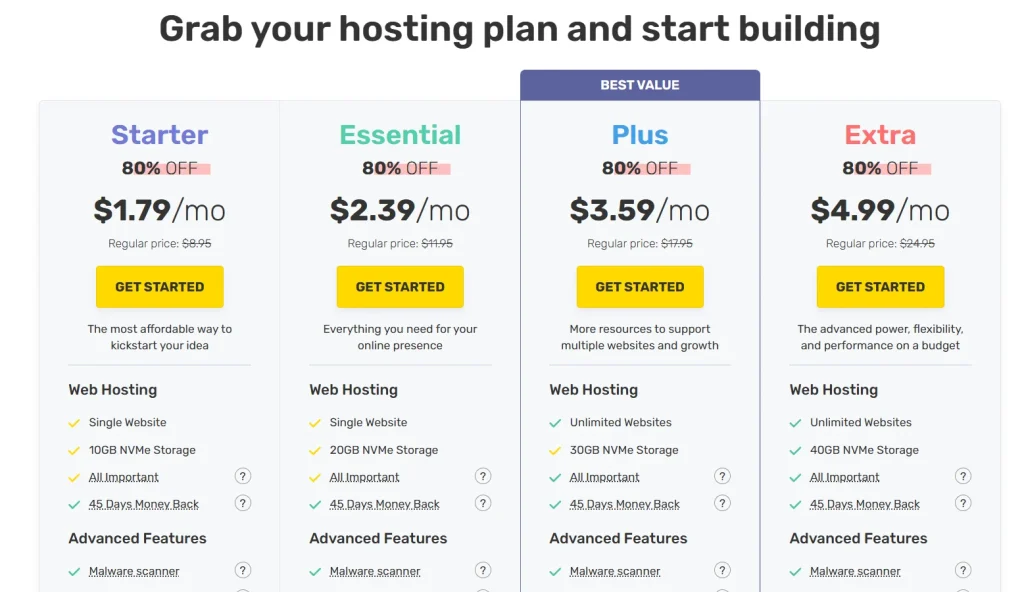
- Go to FastComet.
- Choose the “FastCloud Starter” Plan.
- Register your domain (or transfer if you already own one).
- Complete checkout (monthly plans available!).
- Access your dashboard and launch WordPress in 1 click.
Pro Tips:
- Choose domain privacy protection during checkout (to hide personal info).
- Pick a domain that matches your blog name exactly.
- Start with the basic plan — you can upgrade later.
Hosting done! – Domain secured!
Now that your foundation is ready, it’s time to build your beautiful blog with WordPress—easily, even if you’re not “techy” at all.
Step 4: Install WordPress and Essential Settings
Now that your domain and hosting are live, it’s time to bring your blog to life with WordPress — the world’s most popular (and beginner-friendly) content management system.
Why WordPress?
- It’s free and open-source.
- Highly customizable with thousands of themes and plugins.
- SEO-friendly out of the box.
- No coding required to get started.
How to Install WordPress (1-Click Install)
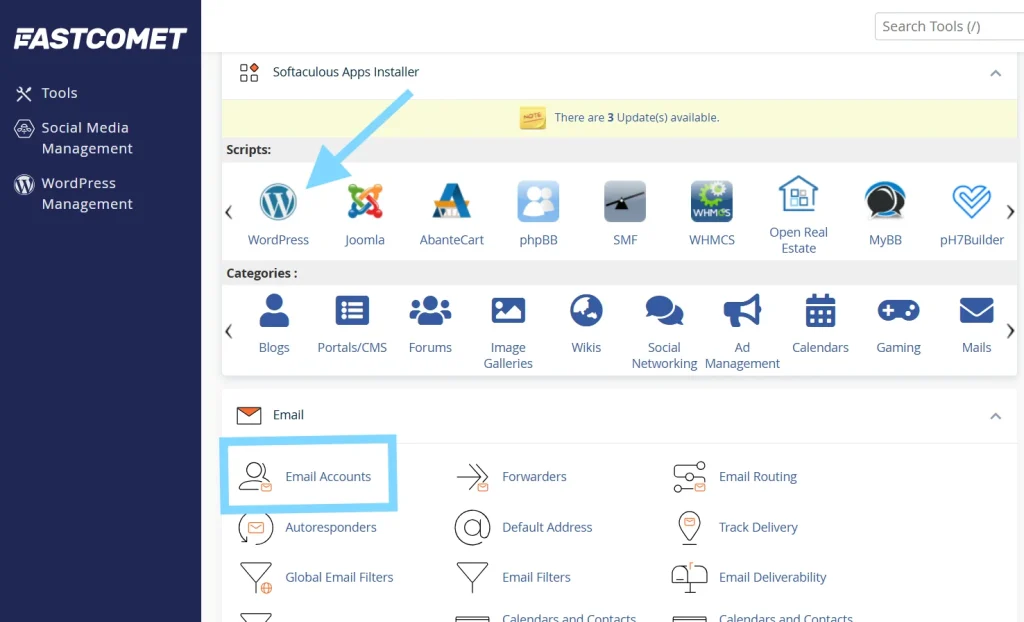
- Log into your FastComet or Cloudways dashboard.
- Find “Softaculous Apps Installer.”
- Select WordPress > Install.
- Fill in basic details (site name, admin username, password).
- Click “Install.” Done in under 5 minutes!
Essential WordPress Settings to Configure Immediately
- Set Your Permalinks:
- Go to Settings → Permalinks.
- Choose “Post Name” for clean, SEO-friendly URLs.
- Change Your Site Title & Tagline:
- Settings → General.
- Make it simple and match your blog branding.
- Install SSL (HTTPS):
- Use your hosting dashboard to activate SSL for free.
- Secure sites rank better and build trust.
- Adjust Timezone and Language Settings:
- Settings → General.
- Match your target audience.
- Disable Unwanted Comments:
- Settings → Discussion.
- Reduce spam by tweaking comment settings.
- Delete Default Content:
- Remove “Hello World” post, “Sample Page,” and stock comments.
WordPress is now installed and properly configured!
Now that your technical foundation is solid, let’s make your blog visually stunning and user-friendly by picking the right theme.
Step 5: Choose and Customize a hiking blog WordPress Theme
Your blog’s design is your readers’ first impression. And let’s be honest: hikers love beautiful visuals!
Best WordPress Themes for Hiking Blogs
| Theme | Why We Recommend It |
|---|---|
| Astra | Lightweight, fast, highly customizable. Free and premium versions available. |
| Kadence | Modern design, easy-to-use starter templates perfect for outdoor niches. |
| GeneratePress | Ultra-lightweight, ideal for speed-focused hiking blogs. |

Where to Find hiking blog Premium Themes
- Elegant Themes (Divi) – Perfect for drag-and-drop beginners.
- ThemeForest – A huge marketplace with outdoor/travel blog templates.
Tips for Choosing Your Blog Design
- Prioritize Mobile-First Design: Most readers will find you via their smartphones.
- Use Large, High-Quality Images: Showcase trail beauty!
- Choose Earthy, Natural Color Palettes: Greens, browns, blues.
- Minimalist Navigation: Make it easy to find trail guides, gear lists, and tips.
How to Customize Your Theme
- Upload a simple logo.
- Set a brand color scheme.
- Configure homepage layout (static page or latest posts).
- Create an intuitive menu (Home, Blog, About, Resources, Contact).
- Install important plugins: SEO, backups, security (we’ll cover soon).
With your stunning hiking blog ready, it’s time to move from design to action — and start creating the essential pages every professional hiking blog must have.
Step 6: Create hiking blog Key Pages
A beautiful design without core pages is like a trail without signs. Let’s map it out properly.
Must-Have Pages for Your Hiking Blog
1. About Page
- Share your hiking story: Why did you start hiking?
- Highlight your values (adventure, conservation, wellness).
- Build emotional connection: Make it personal!
Example:
“Hi, I’m Alex! I swapped my office chair for hiking boots and never looked back. Now, I help new hikers discover their first trails with confidence.”
2. Contact Page
- Make it easy for readers, brands, or collaborators to reach you.
- Embed a simple contact form (use WPForms or Ninja Forms).
- Optional: Share your professional email (use G-Suite with your domain).
3. Blog Page
- List all your published posts automatically.
- Ensure it’s easy to navigate via categories: Trail Guides, Tips, Gear Reviews.
4. Resources Page (Highly Recommended)
- List recommended gear, books, trails, and apps.
- Monetize through affiliate links!
Recommended Resources to Start a Hiking Blog.

You’ve laid down the solid structure. Now let’s breathe life into your blog by writing your very first hiking blog posts!
Step 7: Start Writing Your First hiking Blog Posts ✍️
Alright — your blog’s set up, your pages are polished, and your site looks amazing. Now it’s time to create the heart and soul of your blog: your content.
Blogging is storytelling, especially in the outdoor travel and hiking world. When someone searches for a trail review or tips on how to prepare for a multi-day hike, your blog posts are what will make them stay (and keep coming back).
What Kind of Content Should You Create First?
Here’s a practical starting content strategy for your hiking blog:
| Content Type | Examples |
|---|---|
| Trail Guides | “The Ultimate Guide to Hiking the Appalachian Trail” / “5 Beginner-Friendly Hikes in Utah” |
| Gear Reviews | “Best Lightweight Hiking Boots for 2025” / “Osprey Backpack Review: Worth It?” |
| Tips & Tutorials | “How to Pack Light for a 3-Day Hike” / “Essential Hiking Safety Tips for Beginners” |
| Personal Stories | “What I Learned Hiking 100 Miles in a Month” / “Facing My Fears on Angel’s Landing” |
| Resource Lists | “Top 10 Hiking Apps to Download Before Your Next Adventure” |
As you write, link related posts together. Example: In your “Top Hiking Gear Checklist,” you could link to a full review of your favorite hiking boots.
Quick Writing Tips for Beginners:
- Use personal storytelling alongside practical tips.
- Keep paragraphs short (2–3 sentences max) for mobile reading.
- Add high-quality images or your own hiking photos.
- Include a clear takeaway or call-to-action at the end of each post.
- Make your posts SEO-friendly: focus on long-tail keywords naturally.
Once you have 5–10 solid posts published, you’ll look far more professional and ready to start promotion!
Your first blog posts are live. Time to get the world to notice you!
Step 8: Promote Your hiking Blog
Building a blog is only half the journey — promoting it is what grows your audience.
Think of your blog like a new trail: no one will find it unless you leave signs leading them there.
The Best Ways to Promote a New Hiking Blog
- Pinterest Marketing:
- Create beautiful, vertical pins linking to your blog posts.
- Join hiking and travel group boards.
- Pinterest is a GOLDMINE for outdoor bloggers.
- Instagram Hiking Community:
- Share short hiking stories, trail tips, and epic photos.
- Use niche-specific hashtags: #hikemore #hikingadventures #optoutside
- Engage with other hiking bloggers — comment, like, DM.
- SEO (Search Engine Optimization):
- Write posts targeting specific hiking questions.
- Optimize meta descriptions and ALT tags.
- Internal linking between posts = big SEO boost!
- Guest Posting:
- Write posts for established outdoor blogs.
- Include a link back to your site (great for SEO + audience building).
- Facebook Groups:
- Join hiking communities.
- Share tips, advice, blog posts only when relevant (not spammy).
Promotion Plan for Your First 90 Days
| Week | Action |
| 1–2 | Publish 2 blog posts + pin on Pinterest |
| 3–4 | Join 3 Facebook Groups + comment on 10 hiking blogs |
| 5–6 | Guest post outreach to 5 outdoor blogs |
| 7–8 | Launch your email newsletter (freebie: Trail Packing Checklist) |
| 9–12 | Track SEO rankings and update posts as needed |

Once people start discovering your blog, the next big mission is building a real community — and that’s where the magic happens!
Step 9: Build a Loyal Hiking blog Community
The best hiking blogs aren’t just read — they are felt. They create a sense of belonging among fellow adventurers.
How to Build an Engaged Audience
- Reply to Comments: Always answer when someone comments.
- Start an Email List Early: Offer a simple freebie like “Top 10 Hiking Tips” in exchange for email addresses.
- Create an Online Group: Start a Facebook Group or Discord Server for hikers.
- Share Behind-the-Scenes: Show your gear packing, trail prep, or campsite cooking.
- Host Challenges: “30 Days of Hiking Challenge” with updates via Instagram Stories or blog posts.
A blog without community feels empty. Your mission is to welcome every reader like a trail buddy.
You’re almost there. Now let’s talk about the exciting part: turning your hiking passion into real income!
Step 10: Monetize Your Hiking Blog
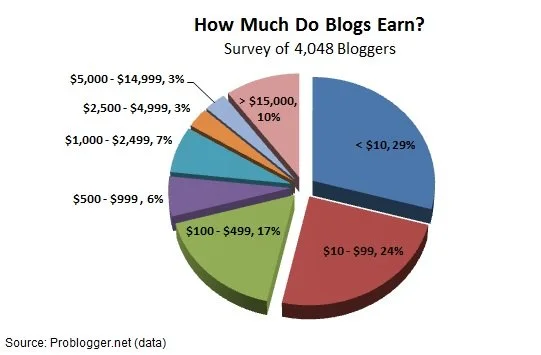
Yes, you can make real money sharing your passion for trails!
Here are smart and ethical ways to monetize your hiking blog in 2025:
1. Affiliate Marketing
- Join affiliate programs: REI, Backcountry, Amazon, AllTrails.
- Recommend products you genuinely love.
- Example post: “Top 5 Hiking Boots for Wet Trails in 2025”
Read More ways to make money blogging : Top Ways to Make Money with WordPress
2. Sponsored Posts
- Collaborate with outdoor brands.
- Example: “How XYZ Backpack Survived My Appalachian Trail Adventure”
3. Sell Your Own Products
- Create ebooks (“Top 50 Day Hikes in the USA”).
- Launch printable trail journals, gear checklists, or packing templates.
4. Launch a Paid Newsletter
- Share premium hiking guides, secret trail spots, insider gear reviews.
5. Create a YouTube Channel
- Combine your blog with vlogging for a double income stream!
Tip: Focus on building trust first. The more you serve your readers, the easier it is to ethically monetize.
Frequently Asked Questions (FAQs)
Q1: Can I start a hiking blog even if I’m a beginner hiker?
A: Absolutely! Many readers love following someone who is learning and growing. Being a beginner makes you relatable.
Q2: How much does it cost to start a hiking blog?
A: You can start for as little as $50–$100 annually (domain + hosting). Most themes and essential plugins have free options.
Q3: What should my first hiking blog post be about?
A: Share a personal story about your favorite hike or your “why” for starting hiking.
Q4: How often should I publish new blog posts?
A: Aim for 1–2 posts per week in the beginning. Consistency is key.
Q5: Do I need professional photos for my hiking blog?
A: No, smartphone pictures are great! Authenticity often resonates more than polished stock images.
Q6: Can I make money from my hiking blog right away?
A: Usually not immediately. Focus on building helpful content and traffic first, then monetize through affiliates, sponsors, and products.
Q7: Should I focus only on one hiking location or multiple?
A: Start local for easier content and SEO wins, then expand to regional, national, or international trails as your blog grows.
Q8: How important is SEO for a hiking blog?
A: Very important! Good SEO ensures your trail guides and gear reviews get discovered by the right readers.
Q9: Should I have a YouTube channel alongside my hiking blog?
A: It’s a great idea! Visual storytelling is powerful for hiking and can drive more traffic to your blog.
Q10: What are some good affiliate programs for hiking bloggers?
A: REI, Backcountry, Amazon, AllTrails, and even independent outdoor gear brands often have affiliate programs.
Q11: How do I protect my hiking photos online?
A: Watermark your images subtly or use plugins that disable right-click downloading.
A: Yes! Even a simple “Trail Tips Weekly” can start building loyal readers early.
Q13: How long does it take to build a successful hiking blog?
A: Typically 12–24 months of consistent posting, promoting, and refining your niche.
Q14: Can I use AI tools to help write my blog posts?
A: You can use AI for outlines and drafts, but always add your personal voice, stories, and expert insights.
Q15: How do I stay motivated to keep blogging when growth feels slow?
A: Focus on your passion for hiking, celebrate small wins (like your first comment!), and remember: every big blog started with zero readers.
You now have every tool in your backpack to build a hiking blog that not only thrives — but changes lives. Let’s wrap it up.
Final Thoughts: Your Hiking Blogging Journey Begins
You started this guide with a simple idea: “I want to share my love of hiking.”
Now you’re equipped with a roadmap to:
- Set up your site the right way.
- Design it beautifully.
- Write inspiring content.
- Grow your audience.
- Monetize ethically.
No more wondering. No more guessing.
- Your trail is ready.
- Your boots are laced.
- Your audience is waiting.
So let me ask you one last time:
Are you ready to step forward and build a blog that could inspire hundreds — maybe even thousands — of new adventurers?
Drop a comment below and share:
Which hiking trail would you write your first blog post about?
I can’t wait to hear your stories and see you hit the trails — and the publish button! 🚀
Need help getting started? Explore our Start Here Guide or Contact Us for personal advice.